Getting Started with Microsoft Agent Framework: Build Practical AI Agents


Getting Started
Welcome! This repository provides a reference implementation of an AI-powered travel assistant built with the Microsoft Agent Framework.
Follow the instructions on the Environment Setup Guide to set up your development environment.
Recommended Learning Path
New to Microsoft Agent Framework?
We recommend starting with the Foundations Labs to master core concepts before exploring the complete travel assistant.
The labs cover essential topics:
- Domain Knowledge - Provide contextual information to language models for more accurate and relevant responses
- AI Skills - Create reusable, file-based skills that extend agent capabilities with custom logic and on-demand resources
- MCP Integration - Securely connect to Model Context Protocol (MCP) servers for external data and service access
- Human-in-the-Loop - Implement approval workflows for safe, controlled execution of agent actions
- Agent Hosting - Deploy agents using the AG-UI protocol for seamless integration with AI interfaces
- Multi-Agent Orchestration - Build collaborative agent systems to handle complex, multi-step tasks
Explore the Application
Once your environment is set up, try these scenarios to see the agent's capabilities in action.
Scenario 1: Flight Booking with Approval Workflow
See the Human-in-the-Loop pattern in action as the agent requests approval before taking actions.
Step 1: Search for Flights
Find flights from Melbourne to Wellington leaving next Friday
Expected: The agent displays available flights with departure times, airlines, and prices.
Step 2: Request a Booking
Book the flight QF107
Expected: The agent shows a booking confirmation dialog and waits for your approval.
Step 3: Approve the Action
Click Approve in the UI.
Expected: The agent completes the booking and provides confirmation with flight details and booking reference.
Scenario 2: Personalization with User Preferences
Try out the agent's ability to remember your preferences and provide personalized recommendations.
Step 1: Build Your Profile
Start a conversation with:
Can you help me plan a trip?
Expected: The agent asks about your preferences (budget, travel style, interests).
Step 2: Share Your Preferences
Respond with your details:
I want to plan a trip with a budget of around $2,000. I love hiking and outdoor activities.
Expected: The agent provides tailored destination recommendations and stores your profile (travel style, budget, interests, past trips).
Step 3: Test Memory Persistence
Start a New Chat and ask:
I want to plan my next vacation
Expected: The agent recalls your stored preferences and provides personalized recommendations without asking for them again.
Architecture Overview
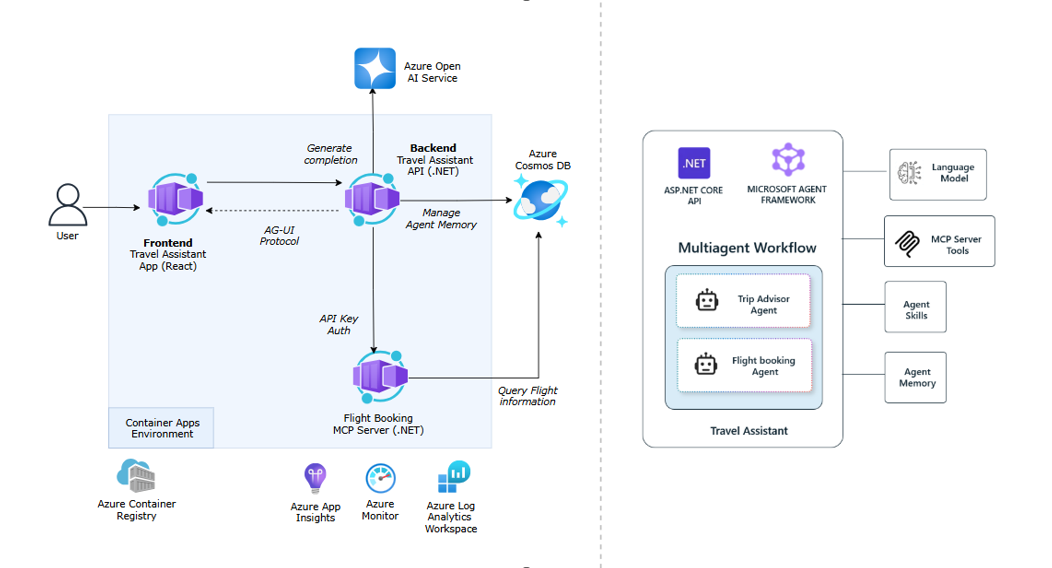
This reference implementation demonstrates a production-ready AI travel assistant with a modern, cloud-native architecture:
Components
- Frontend (Container App) - Interactive user interface built with CopilotKit for seamless agent conversations and real-time interactions
- Backend API (Container App) - .NET 10 ASP.NET Core API that hosts the Travel Assistant agent, publishes via AG-UI protocol, and manages execution, state, and tool interactions
- MCP Server (Container App) - Model Context Protocol(MCP) server implementation for managing flight data and booking operations
- Cosmos DB - Azure Cosmos DB for all application data
- Azure AI Foundry - Provides access to Azure OpenAI models for natural language understanding and generation
- Observability - OpenTelemetry for distributed tracing and Azure Monitor for centralized logging and monitoring of agent interactions.
Next Steps
For more resources on Microsoft Agent Framework, code samples, and related technologies, check out our Learning Resources page.
Happy building!